The practical answer. A backup is useful when you recover the right version and resume work within the required time. Start with fictional test data: back it up through your normal tool, restore it elsewhere and verify the result. A successful job status is not evidence of business recovery.
Start with an essential operation
Choose a task such as retrieving a quotation, invoicing or opening the business application. Identify its data, location and business owner. Include dependencies: application, database, permissions, emergency access and decryption keys. Have the software vendor confirm a supported database-backup method; a copied directory is not proof of a usable database. Use the 3-2-1 guide to examine copy separation.
Distinguish data loss from downtime
Agree two objectives with the business owner. RPO, the recovery point objective, expresses the maximum acceptable age of recovered data. RTO, the recovery time objective, expresses how long the operation can remain unavailable. Count until users can work, including permissions and business validation. These are objectives; tests establish whether they are met. See Microsoft's continuity definitions.
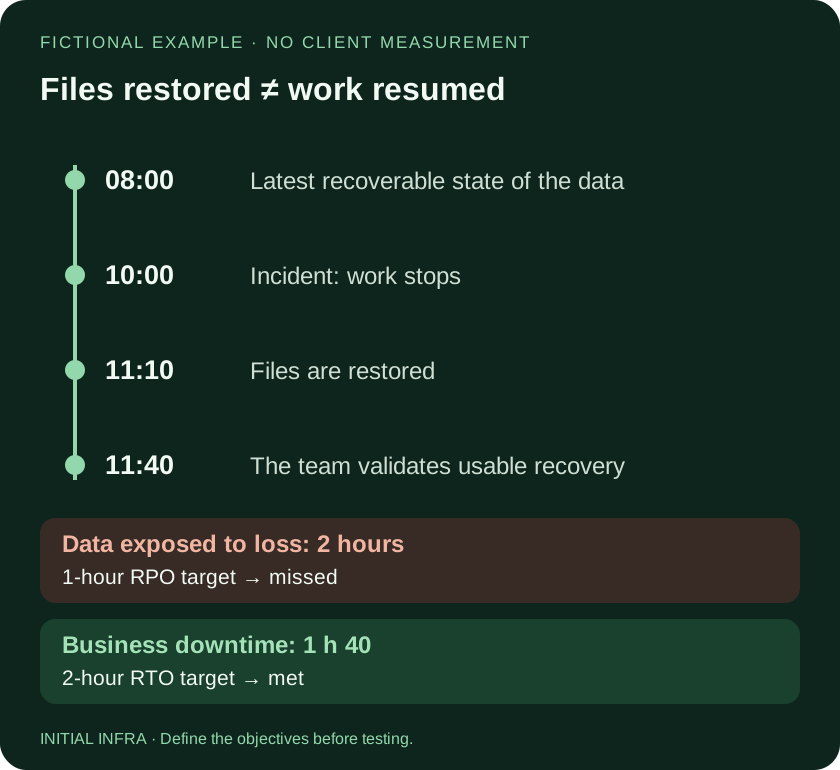
Read the diagram as text
FICTIONAL EXAMPLE · NO CLIENT MEASUREMENT Files restored ≠ work resumed 08:00 10:00 11:10 11:40 Latest recoverable state of the data Incident: work stops Files are restored The team validates usable recovery Data exposed to loss: 2 hours 1-hour RPO target → missed Business downtime: 1 h 40 2-hour RTO target → met INITIAL INFRA · Define the objectives before testing.
In this fictional example, two hours of changes are exposed to loss and downtime lasts 1 hour 40 minutes. An RPO of one hour is missed; an RTO of two hours is met. The job schedule alone does not establish recoverable history: errors or unusable points can make the latest valid copy older. Retention also matters when an error is discovered days later.
Run a safe, small restore exercise
Download the fictional recovery exercise
The kit contains three text/CSV files, a subfolder, expected results and SHA-256 hashes. It contains no client information, macros or executable code.
- With the authorised operator, place the kit's working-data folder in a location covered by your backup. Keep the reference manifest separately. Record location and expected version.
- Let the actual backup run and identify its available recovery point. Copying the originals directly to another folder would not test that backup tool.
- Restore only the test folder into a separate empty destination. Do not remove originals or overwrite production data.
- Find the three files and subfolder. Open them without resaving: verify version V1, two orders and a total of 340 fictional units. Compare hashes to verify the bytes.
- Record start, finish, differences, responsible person and next action. This small exercise does not measure company-wide recovery time.
A file opening successfully does not by itself establish integrity. Matching hashes do not establish correct permissions or a working application. Next, validate a representative business scenario in a suitable test environment. Cybermalveillance.gouv.fr recommends testing backups in its French guidance.
What does a failed test tell you?
| Observation | Next check |
|---|---|
| Missing file | Scope, exclusions and selected recovery point. |
| Older-than-expected version | Last successful jobs and retained history. |
| Different content | Preserve the discrepancy and compare references with the administrator. |
| Correct files, unusable service | Application, permissions, keys and dependencies. |
Include the recovery infrastructure in a later exercise: who can access the backup console if the normal directory is unavailable, where the required keys are held, and which clean system receives the restore. A copy on another site is of limited use if its only administrator login depends on the failed server. Do not write actual keys or passwords in the test record.
Use this worksheet
Restore-test record
Document the recovered point and observed result. Restore to a separate destination with an authorised person. No secrets or client contents in this record.
Complete the worksheet
Nothing is sent or saved automatically. Download your answers before leaving the page.
Success with three fictional files does not certify business recovery or ransomware resistance. Answers remain on this page until downloaded; save them before closing it.
Choose the next exercise according to criticality and after major changes. ANSSI recommendations R21 to R23 call for checking backups and documenting regular restores. The document is in French. Review recoverability with Initial Infra using your scope and test record.