A business VPN is useful when an employee needs access to private resources that are not directly available from the Internet. It should provide access to the required services using a verified identity and limited permissions. A company working entirely in SaaS applications may need a different access arrangement, without routinely routing every connection through its office.
Start with the applications people need remotely. Reading Outlook, opening a file on a server and operating software installed on a workstation do not necessarily require the same solution. A consumer VPN subscription that changes your Internet exit address does not, by itself, connect you to an internal server.
France's cybersecurity agency, ANSSI, approaches remote working through access, traffic flows and device control. Choosing a tunnel is one part of that architecture. See its remote-working recommendations, in French.
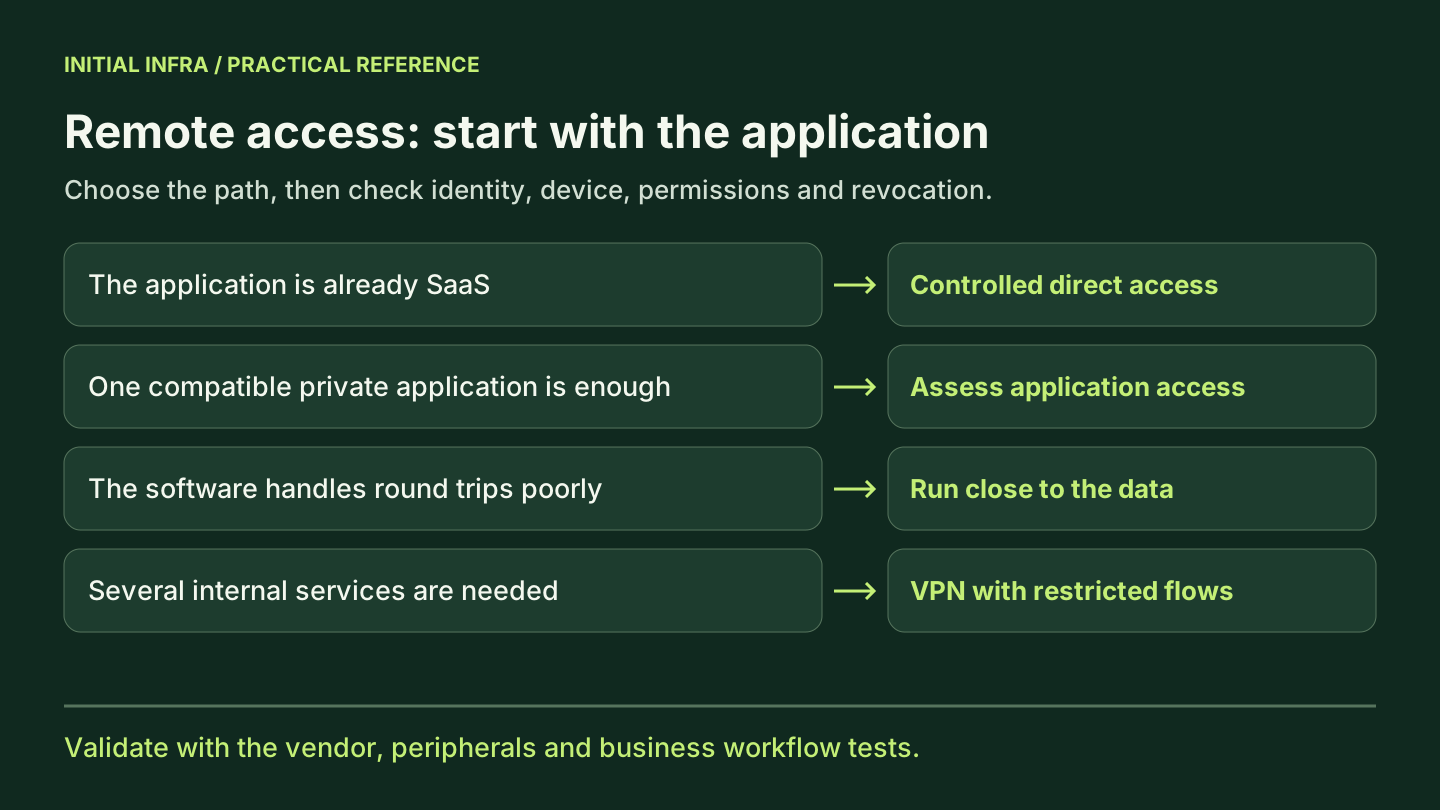
Describe the work before choosing a product
For each role, write down the required action: checking orders, editing a folder, issuing an invoice or administering a server. Specify the people, devices, hours and resources involved. This separates a need for network access from access to a single application.
| Required work | Architecture to examine | What to check |
|---|---|---|
| Use a SaaS application | Direct application access with identity and device controls | Accounts and data are accessible under the intended rules |
| Access several internal resources | VPN with appropriate filtering | Only necessary destinations are reachable |
| Open a specific private application | Compatible application-level access or secure publishing | The connector, authentication and application are supported |
| Use software that performs poorly over a remote connection | Remote desktop or remote application through a secure gateway | Workstation, licenses, capacity and peripherals are suitable |
Have the vendor confirm supported access methods, especially for software using a database or shared files. ZTNA, or Zero Trust Network Access, can restrict access to a particular application under identity and device conditions; compatibility depends on the available protocols and connectors.
If an application is already available online, secure its own access first. Adding an office transit point without a clear purpose can complicate availability and troubleshooting.
The tunnel should not open the whole network
An encrypted connection protects traffic within its scope. It does not justify allowing every remote user to reach backups, equipment administration or another department's files. Filtering should connect people to resources using only the required protocols.
NIST explains that Zero Trust architecture does not grant implicit trust solely because of network location. This supports a simple rule: being connected to the VPN must not become blanket authorization. See NIST SP 800-207.
This fictional matrix can help prepare rules. Exact technical flows, including DNS and authentication, still need to be completed during design.
| Profile | Authorized resource | Business restriction | Negative test |
|---|---|---|---|
| Accounting | Invoicing application | Named users and a managed device | The technical share remains inaccessible |
| Sales | Its team's folder | Sales group permissions | The accounting folder denies access |
| Application supplier | Relevant application | Access limited to the intervention period | Other applications remain inaccessible |
| Administrator | Dedicated administration path | Separate account and agreed procedure | The everyday account does not receive these rights |
A rule opening the “entire internal network” may be easy to implement. It becomes expensive to understand when every new access inherits that opening. Our small-business firewall article explains how to read rules and traffic flows.
Identify the person and understand the device
Use individual accounts and strong authentication appropriate to the service. A shared VPN account prevents reliable attribution of connections and complicates access removal. Make device management explicit too: company equipment, personal devices authorized under conditions, or restricted access through another architecture.
The ANSSI control framework, in French, includes remote-access encryption and logging. To put those principles into practice, document who maintains devices, who reviews logs and how a lost device is removed from scope.
MFA must remain usable when a phone changes or an authentication factor is lost. Prepare a recovery procedure that verifies identity and leaves a record. A permanent exception created in an emergency can become the least protected route into the environment. Our MFA article helps organize this work.
Separate administration from everyday use. A technician answering email on a laptop does not necessarily need administrative access open throughout the day.
Why files can remain slow on a good connection
Throughput describes how much data can be transferred each second. Latency is the time an exchange takes. An application making many round trips can remain slow even when a large file downloads quickly. Examine the network path, packet loss, server and software together.
In a fictional calculation, an operation requiring 100 strictly sequential exchanges with a 40-millisecond round trip already includes 4 seconds of network waiting: 100 × 40 ms. This excludes data transfer and processing time. It illustrates a mechanism; it is not a measurement of a particular application.
Diagnose a slow VPN or an unreachable application
Choose a reproducible action: opening the same folder, loading the same test document or running the same search. Record its duration in the office and remotely on comparable equipment. Note the network used and change only one parameter at a time.
| Symptom | Check to request from support | What it helps distinguish |
|---|---|---|
| The tunnel will not connect | Authentication, MFA, certificate and gateway logs | Rejected identity, an unapproved device or an unavailable gateway |
| The tunnel connects but the server name does not resolve correctly | DNS resolution and the DNS server actually used | A naming issue before changing business permissions |
| The name resolves but the service is unreachable | Route, overlapping subnets, filtering and expected port | A path or transport issue |
| The service responds but denies a folder or application | Presented identity, groups and application permissions | An access denial that opening the firewall will not fix |
| Files transfer quickly but the application remains slow | Round-trip time, loss, application exchanges and server load | A limit that is not necessarily available throughput |
A ping response does not prove that an application works. No response does not prove that every service is unavailable either: the protocol may be filtered. Test the actual required service from an authorized device.
If the software makes many exchanges with the server, running it near the data through remote desktop or remote application access may be more suitable. Have the vendor confirm support and test printing, peripherals, display, capacity and licensing. More bandwidth should address measured saturation, not replace that diagnosis.
Full tunnel or split tunnel: make the choice explicit
With a full tunnel, the relevant Internet and internal traffic travels through the tunnel. With split tunneling, some destinations, such as a SaaS service, use a direct exit. Specify routes, exceptions, DNS and supported address families: the mode's name alone does not describe every traffic path.
The ANSSI remote-working guide, version 2, in French, places strict conditions on split tunneling: risk analysis, technical requirements and exclusion of administration systems. It also prohibits it in certain contexts with high confidentiality or integrity requirements. Do not choose it solely to speed up videoconferencing; your assessment should specify compensating controls and the recommendations applicable to your environment.
Request a diagram showing the paths used by email, videoconferencing, internal files and DNS. Specify what happens if the tunnel drops: which access stops, which remains possible and which controls continue to apply?
Check the path used by security tools too. Microsoft documents a case where isolating an endpoint behind a full-tunnel VPN causes it to lose access to the Defender service. Any technical exception needs assessment within the chosen architecture; it does not override ANSSI's split-tunneling restrictions. See documented isolation limitations.
Fictional example: three uses, three access paths
Imagine a small business using Microsoft 365, a business application installed at its office and a supplier maintaining that application. Asking for “a VPN for everyone” combines three needs that can be addressed separately.
The salesperson works in Microsoft 365. In the proposed architecture, they access the service directly using their account and the agreed device controls. They do not need office-network access to read email or work on documents already hosted in that service. A VPN gateway failure should not block those activities; acceptance testing must verify this.
Accounting uses the business application. Suppose the investigation identifies frequent exchanges with local data and the vendor confirms a supported remote-desktop mode. The application can then run close to the data, behind secure access. Invoice printing, scanning, exports and permissions still need testing. Accept the scenario only if the entire workflow works.
The supplier maintains that application. Their named account receives access limited to necessary resources and the intervention period. The closing check covers both removal of access and the session already open. Giving them the same permanent profile as an internal administrator would broaden the scope without a demonstrated need.
This architecture is a working hypothesis, not a universal configuration. It shows what a quotation should explain: which user takes which path to which resource, and what that path depends on during a failure. Support should be able to find the path without reconstructing it during an incident.
Acceptance testing must check what is denied
Prepare a short series of tests with authorized accounts and devices. For each result, record the user, equipment, time, originating network and target resource.
| Acceptance scenario | Evidence to keep | Reason to reject acceptance |
|---|---|---|
| Normal external connection | Individual account, expected device, MFA and successful business access | Work requires a shared account or unexplained exception |
| Access outside the agreed scope | Denial observed with an ordinary account | The tunnel exposes administration or other services without justification |
| Access removal | New connection denied and the active session's outcome observed | The procedure assumes disabling an account automatically ends every session |
| Lost MFA factor | Recovery follows the procedure and is recorded | A permanent exception becomes the only recovery method |
| Tunnel or gateway failure | Remaining access paths identified and recovery verified | A supposedly protected resource becomes accessible through another path |
For revocation, first open a test session, remove access following the procedure, then separately check reconnection and the established session. Record the times. The acceptable delay depends on business requirements; this test supports a discussion of observed behavior rather than a promise of immediate disconnection.
Office and connection availability remain separate questions. If remote work depends entirely on the office, also assess backup Internet connectivity and the gateway's power and hardware dependencies.
Short answers before choosing
Does a VPN protect a compromised computer?
Encrypting the path does not repair the device. Updates, endpoint protection, permissions and alert handling remain necessary. A tunnel can carry an authorized connection from an unhealthy machine; the architecture must account for that.
Can you expose remote desktop directly to the Internet?
Do not expose a workstation's RDP service directly to the Internet through simple port forwarding. Design access through a secure gateway or suitable private path, with strong authentication, limited permissions, maintenance and logs. A “remote desktop” feature alone does not supply all these controls.
What should a quotation include?
Covered applications and profiles, device management, licensing, support hours, logs, revocation and acceptance tests. Add exit conditions and who is responsible for gateway updates.
To prepare, choose an action that fails or remains slow, then record the user, application, location, time and error message. That reproducible case gives an Initial Infra assessment a starting point. The network review can then determine whether to change a permission, path, capacity or application execution method.
Sources reviewed on 9 October 2026. The matrix and calculation are illustrative; no VPN performance or application compatibility is assumed. English translation prepared on 12 October. ANSSI references concern French guidance; applicability must be assessed for the organization, and evolving details rechecked before publication.
View sources (5)
Support available on this topic
Initial Infra handles these topics for SMBs and mid-size companies. A short call is enough to identify priorities and the right scope of intervention.