Windows Server 2012 and 2012 R2 Extended Security Updates (ESU) end on 13 October 2026, according to Microsoft's ESU announcement and FAQ. The server does not shut down on that date. Its published ESU security coverage ends. Inventory the services it runs, prepare migration or retirement, and test recovery before cutover.
What the deadline changes
| Date | Consequence |
|---|---|
| 10 October 2023 | Standard extended support ended |
| 13 October 2026 | The third ESU year ends, according to Microsoft's ESU announcement and FAQ |
ESU is a conditional security-update programme, not full product support. Check that each affected server is actually enrolled and receiving the applicable updates. A machine without ESU coverage has not been protected merely because the programme exists. SQL Server has a separate lifecycle; record its version independently.
Do not base the project on an unannounced extension. Include virtual machines and apparently unused servers in the inventory. An old file server may still run a scheduled export used every month.
For each system, record its role, business owner, dependencies, users, permitted downtime and recovery method. Prioritise exposed services and applications whose failure would stop operations. Isolation can reduce exposure while a migration is prepared; it does not supply missing operating-system patches.
Migrate, upgrade or retire?
| Situation | Option to examine |
|---|---|
| Service no longer needed | Retirement after checking dependencies and retained data |
| Maintained application | Install on a supported target and transfer the data |
| Supported upgrade path | Test the upgrade on a suitable copy, subject to role and vendor restrictions |
| Blocking legacy application | Document temporary controls, an owner and a firm exit date |
A new server lets you prepare and test the target before moving users. Include permissions, shares, certificates, scheduled jobs and application connections in that transfer.
An in-place upgrade preserves more of the existing configuration and its constraints. The exact source version matters. Microsoft documents a direct upgrade from 2012 R2 to 2025 for compatible non-clustered systems. Do not apply that statement to 2012 without R2, or assume that every installed application supports it. Verify hardware, activation, licensing, vendor support and the official upgrade prerequisites.
Roles have their own procedures. For Active Directory Domain Services, follow Microsoft's recommended migration to new domain controllers rather than treating a domain controller as an ordinary application server. See the role migration guidance.
Prepare a cutover that the business can accept
- Inventory applications, dependencies and supported target versions.
- Prepare the target, run the business workflow and restore a backup.
- Transfer the final data, validate access with users and monitor the service.
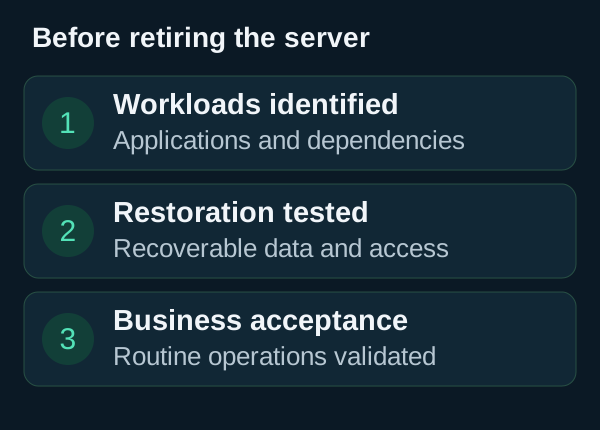
Read the diagram as text
Before retiring the server 1 Workloads identified Applications and dependencies 2 Restoration tested Recoverable data and access 3 Business acceptance Routine operations validated
From a normal user workstation, open and save files, check permissions, print where required and run the scheduled processing. A successful server boot does not validate these operations.
Agree the rollback trigger before reopening the service. The plan must say how to preserve data created after cutover: the old copy does not contain those changes. See the business backup test guide for a starting exercise.
If the application blocks migration, ask its vendor for a supported release and timetable. Record the dependency, temporary restrictions, accountable owner and removal deadline so management can decide with explicit consequences.
Before retiring the old server
- The business owner has accepted ordinary operations.
- Backups of the target can be restored.
- Required history and retained data remain accessible.
- Monitoring, credentials and responsibilities have been transferred.
Virtualisation does not change the guest operating system's lifecycle. Nor can a migration be assumed to have zero downtime: measure the final transfer and acceptance steps during the pilot. For identity and permission planning, use our Active Directory guide.
Calendar and upgrade guidance checked on 25 September 2026 against the Microsoft ESU announcement and ESU FAQ.
View sources (6)
Support available on this topic
Initial Infra handles these topics for SMBs and mid-size companies. A short call is enough to identify priorities and the right scope of intervention.