The practical answer. At the agreed departure time, have the administrator block sign-in and revoke sessions. Transfer necessary business data before deleting accounts or removing licences. Check business applications, external shares and devices separately: closing Microsoft 365 access does not close everything.
Prepare the handover first
The responsible manager sets the cutoff time, the person taking over and the data to retain. Inventory email, storage, CRM, VPN, administrator accounts, shared passwords and devices. Reassign ownership of subscriptions and automations that depend on the departing person's account.
Coordinate mailbox handling with HR. In France, the CNIL recommends notifying the employee of the closure date so they can retrieve private messages. This article describes technical controls and French guidance, not a substitute for the employment and privacy rules applicable to your organisation.
Close Microsoft 365 access and active sessions
For an authorised administrator, Microsoft's process includes resetting the password, signing the user out of sessions and blocking sign-in through Users > Active users. Follow the current Microsoft procedure. Give the successor their own permissions rather than sharing the reset password.
Pressing the button does not establish instant revocation everywhere. Microsoft notes that blocking can take up to 24 hours; session behaviour has its own timing. Verify the effect on the services in use. For identities synchronised from an on-premises directory, handle the account at its source as well. Close independent VPN and application accounts separately.
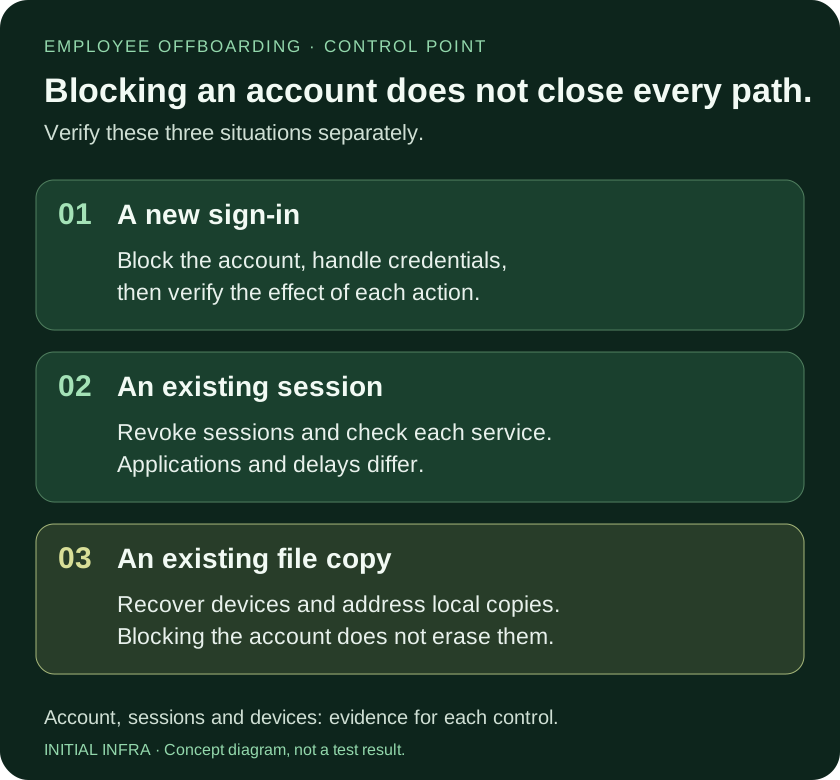
Read the diagram as text
EMPLOYEE OFFBOARDING · CONTROL POINT Blocking an account does not close every path. Verify these three situations separately. 01 A new sign-in Block the account, handle credentials, then verify the effect of each action. 02 An existing session Revoke sessions and check each service. Applications and delays differ. 03 An existing file copy Recover devices and address local copies. Blocking the account does not erase them. Account, sessions and devices: evidence for each control. INITIAL INFRA · Concept diagram, not a test result.
A useful dependency check is to list jobs that run as this person: scheduled exports, connector access, report delivery and renewal contacts. Assign a supported service identity or another authorised owner, test the job, then remove the obsolete personal dependency. Do not leave the former employee's login active just to keep an automation working.
Preserve email without assuming unlimited retention
A justified mailbox can be converted to a shared mailbox. The user needs a licence for conversion. Removing it afterwards depends on size and features such as archiving or retention. Do not delete the associated account: the shared mailbox still needs it. Check Microsoft's conditions, including delegated access and forwarding.
Technical conversion does not justify keeping a named employee address indefinitely or reading private messages. CNIL guidance distinguishes closing the individual address, preserving relevant professional history and protecting messages identified as personal. Agree the retention purpose and authorised recipients with the responsible team.
Move ownership of files, not just a folder shortcut
Have a named successor open the necessary files in a team-controlled space and test their links. Data already in SharePoint may not need moving: verify location and permissions first. Do not treat an unlicensed OneDrive as a permanent archive. Retention depends on account state and applied policies; Microsoft distinguishes deleted users and archived unlicensed accounts. Check current retention rules before removing the licence.
A verified backup serves a different purpose from giving a colleague ongoing working access. Complete both checks when both are required.
Check indirect access and local copies
Inspect invitations to personal addresses, anonymous links and shared accounts. Rotate secrets the person knew while coordinating dependent services. A blocked account does not remove downloaded or offline-synchronised files; Microsoft describes this limitation for personal devices. Recover business equipment and document missing devices. Remote actions depend on existing management controls and an appropriate authorisation framework.
Review SharePoint client-sharing permissions, including older links and group membership.
Ask for evidence of completion
Request a dated record of access and session actions, equipment return, the successor's file checks, retention decisions and unresolved exceptions. Each exception needs an owner and review date. An account marked disabled is only one part of this evidence.
Use this worksheet
Access closure record
Authorised staff complete this record. Note the planned cutoff time and receiving owner. Do not enter passwords or email contents.
Complete the worksheet
Nothing is sent or saved automatically. Download your answers before leaving the page.
This record does not certify immediate cutoff or deletion of downloaded copies. A planned action is not a verified action.
Prepare offboarding with Initial Infra, using the departure date, application inventory and named successor. Do not include secrets in the worksheet.