Business Standard is a reasonable choice when you need everyday work applications and already have device and access security covered elsewhere. Business Premium becomes relevant when you also want to manage those devices, set access conditions and run endpoint protection. The difference comes down to the capabilities you need and who will operate them.
The trap is comparing a Standard subscription that is already being managed with a Premium subscription that exists only on paper. If nobody enrolls the computers, configures access or handles alerts, changing the subscription leaves those tasks unfinished. Compare two working environments, including their administration costs.
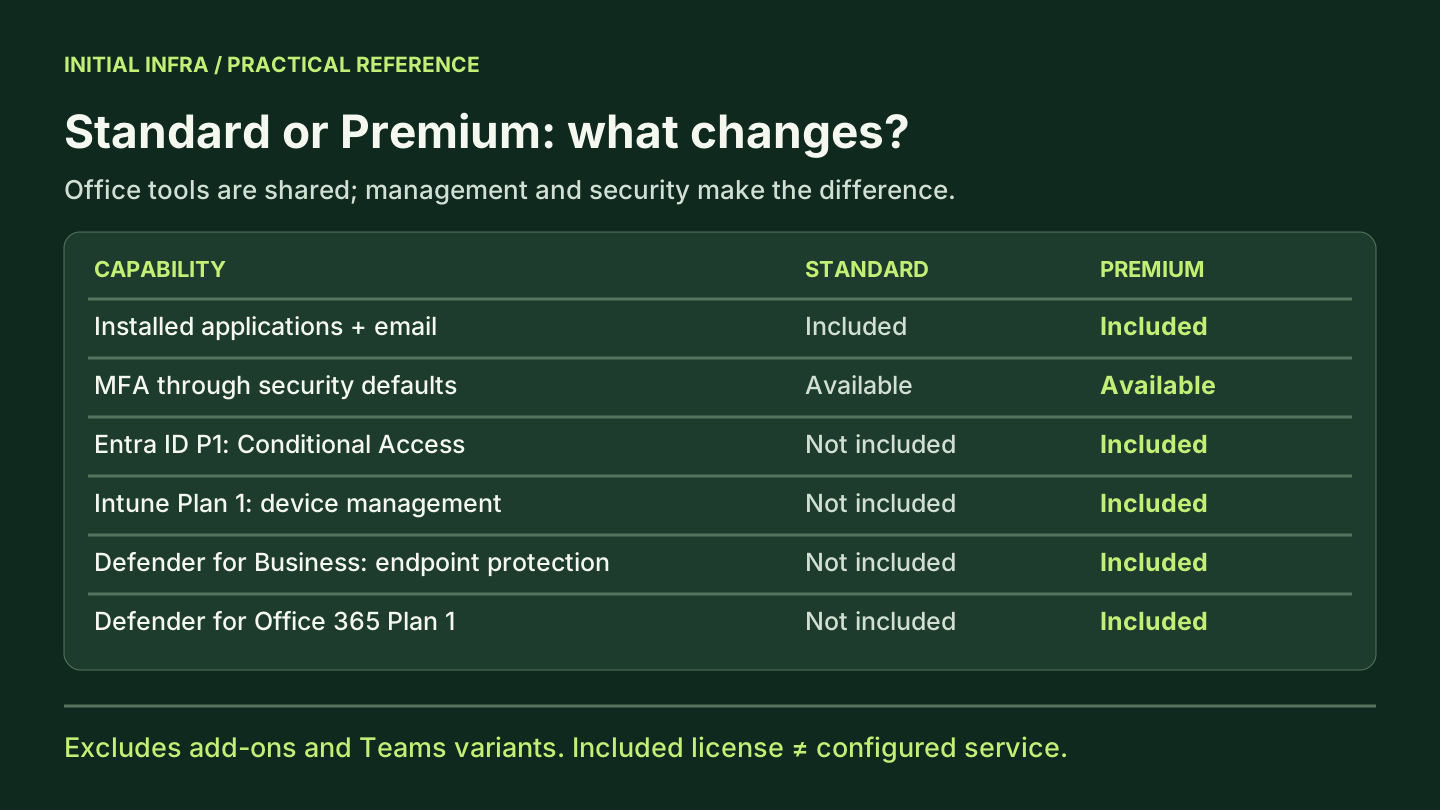
What Standard and Premium include
The core work tools are similar: installed Office applications, business email and collaboration. The practical difference is mainly device management and security. Compare these inclusions, excluding separately purchased add-ons.
| Capability | Business Standard | Business Premium | Practical implication |
|---|---|---|---|
| Installed Office applications, email and shared files | Included | Included | Needing Word and Outlook alone does not justify Premium |
| MFA through security defaults | Available | Available | Standard does not require you to leave accounts without MFA |
| Conditional Access with Entra ID P1 | Not included | Included | Access rules can consider conditions such as device state |
| Device management with Intune Plan 1 | Not included | Included | Devices still need to be enrolled and assigned policies |
| Endpoint protection with Defender for Business | Not included | Included | Deployment and alert handling still need an owner |
| Email protection with Defender for Office 365 Plan 1 | Not included | Included | Policies need to be configured and assigned to users |
| Teams | Depends on the plan purchased | Depends on the plan purchased | Compare the same commercial variant |
This table draws on Microsoft's comparison and its Business Premium security FAQ, reviewed on 9 October 2026. Capabilities absent from Standard may be covered by another subscription or product. “Not included” does not mean “impossible.”
Business plans are aimed at organizations with up to 300 users. As you approach that limit, have your provider check the terms and how your combination of licenses can evolve. When comparing prices, request the exact product reference, whether Teams and any Copilot add-ons are included, the commitment period, payment terms and taxes. Two prices on the same page may describe different bundles.
Recovery needs its own decision. Premium does not prove that all your data can be restored within the time you need. Your choice of Microsoft 365 backup should start with the data you need to recover and an actual restore test.
Can you still enable MFA with Standard?
Yes. Multifactor authentication is not exclusive to Premium. Microsoft provides security defaults in Entra ID to strengthen authentication. Premium adds more control through Entra ID P1: Conditional Access policies can combine criteria and controls suited to your organization. See security defaults and Conditional Access.
Take a concrete rule: “These files must only be accessible from a compliant device.” Entra ID P1 lets you build Conditional Access policies. You also need to define compliance, have it evaluated and test the rule against the application concerned. In a quotation, “compliant” must refer to criteria, not simply a computer appearing in a console.
One licensing boundary matters: policies based on sign-in risk or user risk require Entra ID P2. Premium including P1 does not by itself include those policies. Microsoft distinguishes these requirements in its Conditional Access documentation. Ask the supplier to connect every promised rule to the license that enables it.
Do not disable an existing protection to “get ready for Premium” before planning its replacement. Any transition should preserve a protected, tested emergency administration path. Microsoft documents emergency access accounts specifically. The Initial Infra MFA article can help organize deployment for users.
When does keeping Standard make sense?
Standard remains a defensible choice when device management, access control and endpoint protection are already provided by tools that somebody operates. To check, ask who prepares a new laptop, who removes a departing employee's access and who handles an alert. If those answers are clear and tested, Premium should provide an identified benefit or simplify the setup.
Conversely, if nobody knows which computers access company data and no team monitors their protection, Premium deserves a pilot. The quotation should include the missing work: enrollment, policies, exceptions and ongoing monitoring. Buy the capabilities together with their implementation.
A local server needs a separate assessment. A business application may still need it after users change subscriptions. Your systems management must maintain coverage for that server, even if an existing tool can be replaced on workstations.
Calculate the full cost without inventing savings
Compare subscriptions, tools you can genuinely replace, transition work and operations over the same period. A license discount does not necessarily offset keeping old contracts or taking on unmanaged administration.
Consider a fictional example with 25 users. Assume a license difference of €9 per user per month and an existing tool costing €4 per user per month that can actually be canceled. These are calculation assumptions, not Microsoft list prices.
| Item | Calculation | First-year amount |
|---|---|---|
| Additional license cost | 25 × €9 × 12 | €2,700 |
| Existing tool actually canceled | 25 × €4 × 12 | −€1,200 |
| Initial implementation | Illustrative assumption | €1,500 |
| Additional administration | Assumption: €60 × 12 | €720 |
| Additional cost in year one | 2,700 − 1,200 + 1,500 + 720 | €3,720 |
If the old tool must remain, the additional cost becomes €4,920. You can count the €1,200 saving only once the replacement is technically validated and cancellation is possible. Treat taxes, contractual commitments and other differences consistently across both offers.
If these assumptions remain valid, the recurring additional cost would then be €2,220 a year: 2,700 − 1,200 + 720. Over three years, the total would be €8,160, counting the €1,500 implementation cost only once. This scenario does not demonstrate a return on investment; it prices additional capabilities. To claim savings, you would need to compare all expenditure for equivalent services.
You can reuse the formula with your figures: license difference − expenditure genuinely removed + implementation + change in operating cost. For the service component, our article on managed IT costs explains what a per-device price may leave out.
A pilot must prove more than installation
Choose representative devices: an office workstation, a remote laptop, another operating system if you use one, and a user with a sensitive business application. The aim is to test real workflows before applying policies broadly.
Before changing anything, record the protections already active and prepare rollback. Conditional Access report-only mode lets you observe a policy's expected effect without enforcing it. A favorable result in that mode does not demonstrate that access is actually blocked. Then test enabled policies on the pilot group:
| Pilot test | Expected result | What prevents wider rollout |
|---|---|---|
| Managed workstation, authorized user | Business applications and documents work | A required application remains unusable |
| Noncompliant device, protected resource | The intended denial occurs and its reason can be identified | Access remains possible or support cannot explain the denial |
| Representative device, documented test alert | The signal arrives and its owner handles it | The agent is installed but no handling is demonstrated |
| Emergency administrative access | The procedure works under the planned conditions | The team relies on one account or one phone |
| Existing tool assumed replaceable | Its useful functions are covered throughout its scope | A server or critical use case loses coverage |
Record the device, account, policy, date and result of each test. Correct failures before wider rollout. Cancel a tool only after validating its replacement and checking the contractual exit terms.
Questions to resolve before signing
Can you mix Standard and Premium?
Different subscriptions can coexist in one organization. However, each user benefiting from a capability needs the appropriate license. A single Premium license does not entitle you to apply all its capabilities to everybody. Have your supplier validate the allocation against your actual uses, then check that it remains manageable.
Are servers covered in the same way as computers?
Do not assume so. Microsoft distinguishes server protection within Defender for Business, with an additional server license. Request an inventory of covered systems and their associated licenses. See Defender for Business coverage.
Must you replace everything to make Premium worthwhile?
No. Keeping a tool can be justified by its features, a business constraint or a cautious transition. But paying indefinitely for two tools covering the same need should be an explained decision. Ask which function justifies keeping it, who manages it and when the decision will be reviewed.
Before ordering, get the decision in writing
The recommendation should fit on one page: required capabilities, capabilities already covered, components to deploy, tools to keep or cancel, transition budget and recurring cost. Add an owner and an acceptance test for each change. A line saying “enhanced security” without these details will not help you choose between quotations.
For an Initial Infra assessment, bring your current subscriptions and device inventory. The first decision is what Premium genuinely replaces, what it adds and what still needs funding.
Product sources reviewed on 9 October 2026 and rechecked before publication on 12 October. Names, inclusions and commercial terms must be checked against the offer you actually purchase. The cost example is fictional and retains the original euro assumptions.
View sources (7)
Support available on this topic
Initial Infra handles these topics for SMBs and mid-size companies. A short call is enough to identify priorities and the right scope of intervention.