To protect a domain used with Microsoft 365, identify every sender, configure SPF and DKIM, then check alignment with the visible sender address before tightening DMARC. Outlook is often only one sending path. Invoicing software, website forms and a CRM may use other servers.
An invoice can show your address while being sent and signed using your software provider's domain. If that difference remains unnoticed, a stricter DMARC policy can expose the problem at the worst moment: when a customer is waiting for the invoice. Follow every sending path through to the received message.
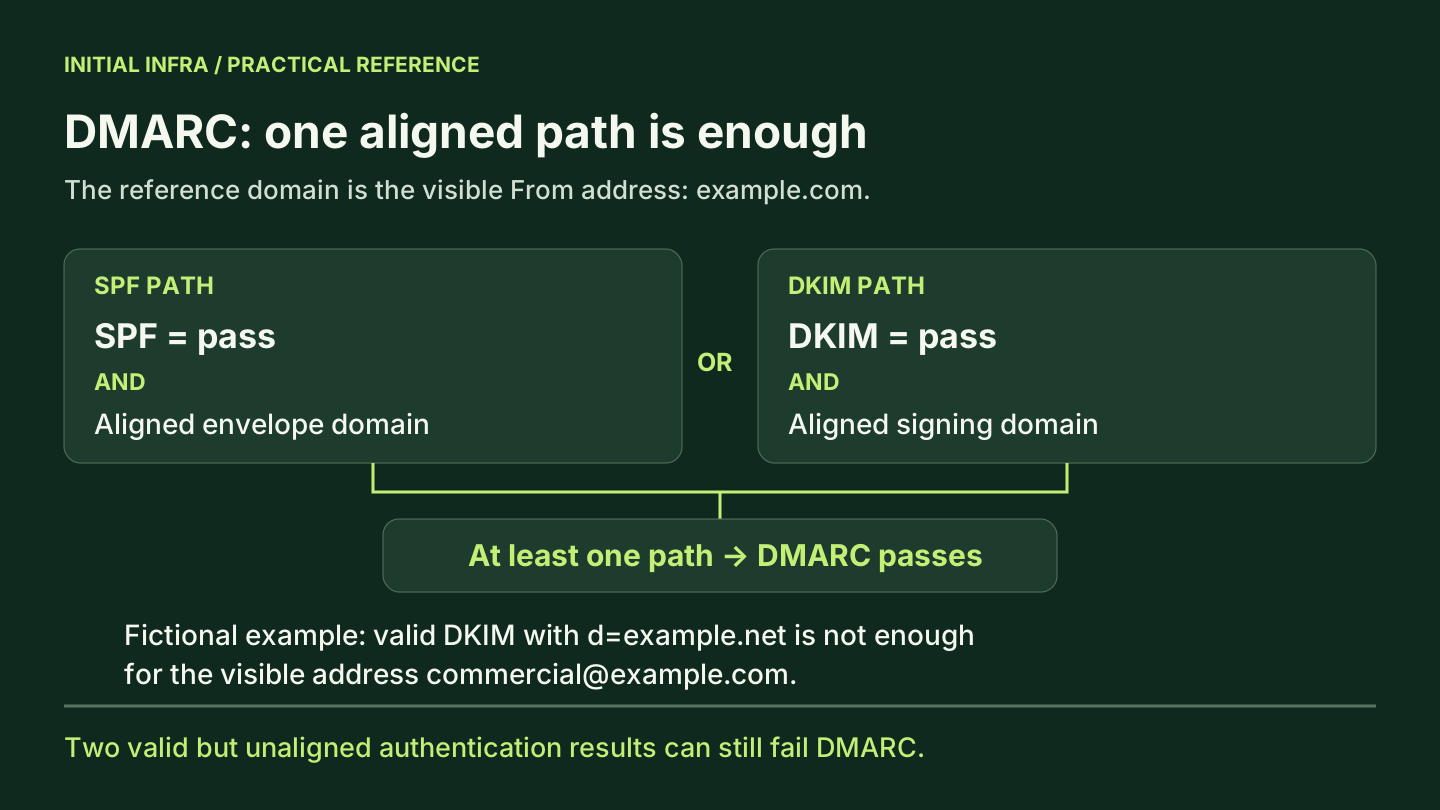
SPF, DKIM and DMARC check different things
SPF identifies which servers may send for a domain used in the message envelope. DKIM validates a signature associated with a domain and the integrity of the signed parts. DMARC connects authentication to the domain in the From address that the recipient sees and publishes a policy for handling failures.
| Mechanism | Question it addresses | Limit to remember |
|---|---|---|
| SPF | Is this server authorized for the envelope domain? | That domain may differ from the visible address |
| DKIM | Is the domain's signature valid? | A valid signature from another domain may not be enough |
| DMARC | Does at least one valid authentication result align with the visible domain? | A pass guarantees neither legitimate content nor inbox placement |
SPF is specified in RFC 7208. In practice, record three separate domains: the visible address domain, the domain evaluated by SPF and the DKIM signing domain. Confusing them explains many “authenticated” messages that nevertheless fail DMARC.
1. Inventory senders before changing DNS
Ask teams what sends messages using your domain. Accounting may use a tool the Microsoft 365 administrator never configured. A form may send confirmations, and a supplier may run occasional campaigns. Every legitimate flow needs an owner who can provide a test message.
Here is a fictional inventory to adapt to your business:
| Flow | Sending service | Person validating it | Business test |
|---|---|---|---|
| Individual email | Exchange Online | IT owner | Message to two controlled external recipients |
| Invoices | Invoicing software | Accounting | Test invoice containing no customer data |
| Website form | Website relay | Website owner | Submission, receipt and reply |
| Sales follow-up | CRM | Sales owner | Test sent through the actual workflow |
| Technical alerts | Documented relay | Operator | Harmless notification trigger |
Add the visible domain, envelope domain and DKIM domain actually observed. A product name is insufficient: its sending method may vary with configuration.
Keep the current DNS zone, relevant values and rollback procedure. Also check who owns the DNS provider account and how to access it if email is unavailable. IT provider exit arrangements should cover critical access of this kind.
2. Check SPF without overwriting other services
A domain name should not publish multiple competing SPF records. If several services use that envelope domain, organize their authorizations into one coherent SPF record. Microsoft gives this example for a case where Microsoft 365 is the only relevant sender:
v=spf1 include:spf.protection.outlook.com -all
Do not replace your current SPF record with this line before completing the inventory. You could omit a relay, business application or other legitimate service. Microsoft's SPF documentation distinguishes the configurations.
SPF limits certain DNS lookup mechanisms and modifiers to ten during evaluation. Nested includes count too: nine visible include terms do not prove compliance with the limit. Diagnose a permerror result instead of arbitrarily authorizing every server.
Separating uses by subdomain can clarify the setup, provided you also configure the addresses, signatures and policies for those flows. This is an architectural choice; adding a DNS subdomain does not reconfigure the CRM.
3. Get DKIM values for your own domain
For a Microsoft 365 custom domain, obtain the CNAME values requested by your environment, publish them with your DNS provider, then enable signing once the records are recognized. Check an actual outbound message afterward. The CNAME records alone do not prove that it is signed as intended.
Microsoft changed the value format for new custom domains from May 2025. Older examples are not universal values to reconstruct from memory. Use the values displayed for your domain in the portal or returned by the appropriate administration tools. See Microsoft DKIM configuration.
For invoicing software and the CRM, follow their procedures for signing with your domain. Enabling DKIM in Microsoft 365 does not automatically sign messages sent by an independent platform.
4. Understand alignment through an example
Imagine a CRM displaying commercial@example.com, while using bounce.example.net in the envelope and signing with example.net. SPF and DKIM passing for example.net do not prove that the message is authorized to present itself as example.com.
These are fictional, simplified headers, illustrating how a trusted receiving system could report that case. The domains example.com and example.net are used only as examples.
From: commercial@example.com
Authentication-Results: mx.destinataire.example;
  spf=pass smtp.mailfrom=bounce.example.net;
  dkim=pass header.d=example.net;
  dmarc=fail header.from=example.com
Both pass results concern example.net, while the visible address presents example.com. Here, the correction is to have the CRM sign with the authorized custom domain. After configuration and a fresh test message, the expected result would be:
From: commercial@example.com
Authentication-Results: mx.destinataire.example;
  spf=pass smtp.mailfrom=bounce.example.net;
  dkim=pass header.d=example.com;
  dmarc=pass header.from=example.com
SPF can remain unaligned in this example: the valid, aligned DKIM signature is sufficient. DMARC does not require both paths to succeed. Alignment may be strict or relaxed, depending on the published settings. Microsoft's DMARC documentation describes these checks.
Relaxed and strict alignment also change the diagnosis. In an example where example.com is the common organizational domain, a valid d=mail.example.com signature can align with a From address at example.com in relaxed mode; these different domains do not align in strict mode. The adkim and aspf parameters control those modes. The DMARC RFC distinguishes them from the p policy. Moving to p=reject and moving to strict alignment are therefore separate changes to test.
Use the results added by your trusted receiving system to check a message. An arbitrary header inserted by the sender is not independent evidence. Do not publish full headers: they may contain addresses, identifiers and routing information.
| Observed result | Useful first check | Correction to avoid |
|---|---|---|
SPF permerror | Competing records, syntax and nested DNS lookup cost | Adding more include terms without calculating their effect |
SPF fail | Actual sending IP and envelope domain, including after forwarding | Authorizing all senders with +all |
DKIM none | Whether this service signs the flow with the intended domain | Assuming Microsoft CNAME records cover the CRM too |
DKIM fail | Selector, DNS key and changes to signed content | Rebuilding SPF in an attempt to repair a signature |
SPF and DKIM pass, DMARC fail | Alignment with the visible domain | Treating two pass results as sufficient validation |
When a message is forwarded, the retransmitting server may cause SPF to fail for the original domain. An aligned DKIM signature can preserve a DMARC pass if the signed parts remain intact. Test the forwarding paths actually used; they are not all equivalent.
5. Move from observation to a stricter policy
Compare reports with the sender inventory. A failure from an unknown source and a failure from invoicing software need different responses. Classify the unknown source; correct the legitimate business flow. Do not add an IP address to SPF solely because it appears in a report.
The following is an illustrative example for the reserved domain example.com. It assumes the reporting address is ready. It is not a record to copy unchanged into your zone:
Name: _dmarc.example.com
Type: TXT
Value: v=DMARC1; p=none; rua=mailto:dmarc@example.com
Aggregate reports are defined in RFC 9990. They help you observe sources and authentication results. They are not an exhaustive record of every message sent: recipients do not necessarily all provide the same reports. A reporting destination outside your domain may also require specific DNS authorization.
| Stage | Proposed condition for progressing |
|---|---|
| Observation | Reports arrive; each known flow has an owner; unknown sources need classification |
| Correction | Legitimate CRM, invoicing, website and Microsoft 365 messages have been tested |
quarantine policy | No identified critical legitimate flow has an unexplained failure; support knows the rollback procedure |
reject policy | Occasional uses and relevant subdomains are validated; remaining exceptions are documented |
RFC 9989, published in May 2026, replaces RFC 7489 and removes the pct parameter. Receivers and guidance may evolve at different speeds. Do not base a transition on the assumption that pct=10 guarantees strict handling of exactly 10% of failures everywhere. Govern progression through identified flows, tests and received reports.
There is no universal number of days to wait. A company sending invoices at month-end needs to include that cycle in observation or arrange a representative test. If a domain policy covers subdomains, inventory those too before tightening it.
The aim is not to remove every reported failure: unauthorized messages may continue to fail, as expected. You need to distinguish them from legitimate messages that remain misconfigured. Recipients retain local rules; even p=none does not require them to accept a message considered unwanted for another reason.
Acceptance checks before considering the work complete
Send a message through each agreed flow to authorized test mailboxes. Record the time, originating service, useful headers and result. Check replies, actual forwarding paths and representative business attachments too.
The following DNS checks are read-only. They use example.com; replace it with a domain you are authorized to administer:
Resolve-DnsName -Type TXT example.com
Resolve-DnsName -Type TXT _dmarc.example.com
Resolve-DnsName -Type CNAME selector1._domainkey.example.com
Resolve-DnsName -Type CNAME selector2._domainkey.example.com
These commands display DNS records. They do not independently validate a message's signature, alignment or receipt. Pair each observation with a sending test and account for DNS caching when interpreting differing results.
Two limitations to explain to teams
Why does authenticated email still land in spam?
Authentication is only part of processing. Reputation, sending behavior and recipient policies also matter. Gmail's sender guidelines distinguish several requirements. A DMARC pass does not guarantee inbox placement.
Does DMARC prevent all impersonation?
No. An attacker can use a lookalike domain, a misleading display name or a genuinely compromised account. Domain protection complements account MFA, payment verification and data security.
What to hand over to the team
Keep a record for each flow: owner, visible address, SPF domain, DKIM domain, DMARC result, test recipient and date. Add the published policy and the person authorized to change it. This makes it possible to assess the next CRM or invoicing tool without restarting the investigation.
If a flow remains unexplained, an Initial Infra assessment can start with its headers and sending configuration. Your email environment can then be examined through a specific message, rather than only a DNS checker's score.
Sources verified on 9 October 2026. Example domains, flows and headers are fictional. English translation prepared on 12 October; standards and provider requirements must be rechecked before publication.
View sources (7)
Support available on this topic
Initial Infra handles these topics for SMBs and mid-size companies. A short call is enough to identify priorities and the right scope of intervention.