The short answer. To migrate from VMware ESXi to Proxmox, use the built-in import wizard if it supports your source. Otherwise, prepare an OVF/VMDK export or a virt-v2v conversion. Start with a pilot VM: check boot, application, network and restore. Plan the source shutdown and final data transfer before moving the rest of your environment.
How to use this guide. Start by choosing a method and identifying what you must rebuild around the VM. Then use the worked example, business acceptance tests and workbook to prepare the change. Qualify the commands against the versions in your own environment.
Contents
How do you migrate VMware to Proxmox?
Choose according to source access, system condition and acceptable downtime. The number of VMs comes next.
| Situation | Method to assess |
|---|---|
| ESXi is accessible and the import is supported | Proxmox built-in wizard |
| An export is available but direct import is blocked | OVF with its configuration, or VMDK alone |
| The guest needs adapting to KVM | Convert with virt-v2v, then import |
| Several VMs share the same prerequisites | Automate the already validated workflow |
| A backup can be restored on the target | Use a restore path supported by your product |
| The application or OS has no maintained migration path | Create a new VM and transfer the service and data |
Direct import from ESXi
In Proxmox, open Datacenter → Storage → Add → ESXi, enter the host and credentials, then select a VM in the source and click Import. Choose the target storage and network bridge. Prefer a direct connection to the host; going through vCenter can slow the transfer. Proxmox procedure.
Record CPU, RAM, disks, BIOS/UEFI and networks beforehand. Matching the configuration does not demonstrate that the application works: also test its dependencies, licences and scheduled jobs.
What must be rebuilt around the VM?
Importing disks does not move the entire operating environment. Veeam's migration continuity guide highlights dependencies and protection during coexistence. Turn each dependency into a check for your project:
| Component in use today | Question to resolve on the target | Suggested validation |
|---|---|---|
| Virtual network, VLAN and firewall | Which bridge, VLAN tag and rules? | Permitted connections succeed; prohibited connections are refused |
| Storage and snapshots | Where will volumes reside? Which snapshot capabilities does this storage provide? | Create and restore a test point using the chosen workflow |
| Backup and retention | Which job protects the new VM? How will old backups be read? | Restore on the target and access an older VMware restore point |
| Automatic restart and placement | What happens if a node fails or runs out of resources? | Document and test a failure scenario outside production |
| Monitoring and on-call response | Who receives alerts? Who intervenes? | Send a real test alert to the correct person |
| Application licence and support | Does the vendor support this platform and configuration? | Obtain a written response or dated support matrix |
This is a suggested acceptance checklist. For high availability, monitoring and VM placement, check the capabilities of your version and how your organisation will operate them. Each requires its own configuration and validation.
Write the network mapping before import
A bridge connects a virtual network adapter to a network available on the host. A VLAN separates logical networks; its number alone does not ensure that traffic reaches the correct physical network. The Proxmox networking documentation covers bridges and VLAN configurations.
Fictional example to validate with the network administrator:
| Source | Isolated pilot | Final cutover |
|---|---|---|
| APP port group, VLAN 120 | Isolated test bridge; no customer access | Target bridge and VLAN 120 validated end to end |
| Static IP and internal DNS | Test address; controlled dependencies | Agreed IP/DNS; old adapter recorded |
| DHCP reservation tied to a MAC address | Test reservation | New reservation or retained MAC, according to the plan |
| SMTP deliveries and overnight jobs | Disabled or redirected to test destinations | Re-enabled once, after business approval |
Do not switch every server to DHCP to work around an adapter issue. That would also change dependencies. An adapter detected by the OS does not prove that the VLAN or DNS works.
Prepare Windows, Linux and sensitive workloads
The NAKIVO tutorial demonstrates a Windows Server 2022 workflow that configures the VM and attaches its disks. It helps explain the sequence, but its settings match its own environment. Choose your controller according to the drivers actually available in your guest.
Windows. Record BIOS/UEFI, the storage controller, encryption state and network adapter. Arrange console access and drivers compatible with your Windows version. Test that the drivers load before using VirtIO for the boot disk. If you temporarily use a controller already recognised by the guest, validate each change separately. Whether to remove VMware Tools depends on the chosen method; do not uninstall a component your workflow still needs.
Linux. Check volume mounts, identifiers in fstab, expected interfaces and modules needed at boot. The initramfs is the initial environment that provides access to the system disk, among other tasks. A correctly copied disk may still fail to boot if that environment does not recognise the target controller. Proxmox VM configuration, guest adaptation with virt-v2v.
A domain controller needs a different approach from a general-purpose VM
Microsoft documents Active Directory safeguards involving the VM-Generation ID. These do not make it safe to bring two copies with the same identity online. Define an appropriate AD migration path, check replication and plan a supported restore; do not blindly apply a standalone VM rollback procedure to a directory. Virtualised domain controller architecture.
For a transactional database, application cluster, shared disk or device passed directly through to a VM, agree the workflow with the operator and vendor. Migrating the service to a new VM may be preferable to converting the entire machine.
Encryption: distinguish VMware disk encryption from encryption inside the guest. Before changing a virtual TPM, Secure Boot or a disk protector, identify the mechanisms involved and verify that recovery methods are available. Test restart on a copy. Any procedure requiring decryption must be assessed and controlled for your environment; it is not a universal step to perform automatically.
How much space do export and conversion need?
Distinguish virtual capacity, space actually allocated, export size and temporary space. File storage and block storage support different formats, so QCOW2 is not a universal destination. Use the Proxmox storage documentation to check the capabilities of your selected storage.
Fictional workspace sizing example: a measured export of 180 GB and an expected converted file of 240 GB must coexist. The expected peak is 420 GB. With a 60 GB reserve chosen for this example, the workspace needs 480 GB free, separately from the final storage requirements. That reserve is not a percentage recommended by Proxmox. Measure the pilot's files and include OVA extraction, logs, possible snapshots and growth.
Before import, run these inventory commands on the target node. They do not create or delete a VM:
pveversion -v
pvesm status
qm list
Keep the versions, exact storage name and available capacity. Storage marked active does not prove it accepts the desired format. For a temporary file workspace, also check its underlying filesystem. Check options against the help for your pvesm and qm versions before running commands that make changes.
Restoring from backup: verify the exact workflow
Restoring to a different hypervisor is an option when your product and versions support it. Veeam publishes a Proxmox, plug-in and backup server support matrix. Protecting Proxmox VMs, restoring a VMware VM to Proxmox and recovering an individual file are different operations.
Ask for a demonstration on a representative VM, a list of limitations and the backup path after cutover. Running temporarily from a backup repository may require finalisation onto production storage; check this step in your product. You cannot retire the source simply because the target VM has booted.
Commands to import OVF, OVA or VMDK
Run these examples in the target Proxmox node's shell, with the necessary permissions. Have a restorable backup and a consistent export taken while the VM was shut down. Adapt paths and storage; local-lvm must exist and have sufficient space. 900 must be unused for the OVF import; 901 must be reserved and assigned to the empty VM in the VMDK example. The two examples are alternatives.
Import a VM exported as OVF
OVF describes the configuration; VMDK files contain the disks. Keep every file in the export together, then run:
qm importovf 900 \
  /mnt/import/serveur.ovf \
  local-lvm
qm config 900
The first command creates the VM and imports its disks. The second displays its configuration. Before booting, check the network adapter, controller, firmware and boot order. OVF does not reproduce every VMware setting. OVF import documentation.
An OVA packages these files in an archive. Depending on your version, use the interface's OVA import or extract the contents into a dedicated directory before importing the OVF.
Import a VMDK disk on its own
First create an empty target VM, without a disk, using the source's resources and BIOS/UEFI mode. For that VM, here 901:
qm disk import 901 \
  /mnt/import/serveur.vmdk \
  local-lvm
qm config 901
The disk appears as Unused Disk / unusedX. In Hardware, attach it to the appropriate controller; in Options → Boot Order, select the system disk. Repeat for other disks, respecting each disk's role.
Use the VMDK descriptor alongside the files it references, including -flat.vmdk where present. An isolated file from a snapshot chain may not represent the VM's complete state. Proxmox disk import.
Do you need to convert to QCOW2 first? Import can perform the conversion. --format qcow2 applies to compatible file storage; do not automatically add it when importing into LVM-thin or ZFS.
Convert with virt-v2v
On a Linux conversion machine, with virt-v2v installed and an existing output directory:
virt-v2v -i ova \
  /mnt/import/serveur.ova \
  -o local -os /mnt/converti \
  -of qcow2
Unlike a simple format conversion, virt-v2v can adapt the guest to KVM and prepare its drivers. The resulting files, commonly name-sda and name-sdb, must then be transferred to Proxmox, imported and attached. This command does not create the Proxmox VM. The required Windows drivers must be available during conversion. virt-v2v manual.
Input may also come from a VMX file or a VMware connection. Each transport has its own prerequisites; VDDK, for example, adds VMware libraries. The source VM must be shut down during conversion. virt-v2v VMware inputs.
Automate after validating the pilot
A batch tool becomes useful when several VMs share a method you have already tested. It does not replace application-by-application checks. When choosing one, record its version, permissions, prerequisites, logged steps and behaviour after interruption. Validate one isolated VM, then a small batch.
Choosing a community project requires reviewing its documentation and maintenance at deployment time. Do not choose a tool solely on a promise of one-click migration.
What can block a migration?
| Issue | Option to investigate |
|---|---|
| vSAN | For native import, first move disks to supported storage if possible |
| Encrypted disks / vTPM | Check VMware decryption requirements and retain guest recovery keys; vTPM state is not carried over by the documented import |
| Slow or interrupted import | Check snapshots, throughput, free space and API load; reduce concurrent imports |
| Blue screen at boot | Test a recognised SATA/IDE bus, then install a compatible VirtIO driver before changing the controller |
| No bootable device | Recover the BIOS/UEFI setting, system disk and boot order; inspect the bootloader if needed |
| Linux will not start | Check drivers in the initramfs; rebuild it using the distribution's procedure |
| VM starts but has no network | Check driver, bridge, VLAN, IP, DNS and MAC-based DHCP reservations |
| Application error | Check licences, dependencies and vendor support for the version |
Import restrictions are listed in the migration guide. For boot and controllers, consult the Proxmox VM documentation. The networking guide helps prepare bridge and VLAN mappings. These symptoms guide diagnosis; they do not establish a definite cause.
Migrating from ESXi 5.5: which method should you choose?
The Proxmox documentation consulted specifies a tested range of 6.5 to 8.0 for this wizard. This is not an exhaustive matrix of versions available today. For 5.5 or another version outside that range, validate import in a lab, then assess export, conversion or restore options.
Distinguish the hypervisor from the guest OS. Updating ESXi does not fix Windows or Linux. Record patches, drivers and dependencies, and test required updates on a copy. The newest VirtIO driver may not support an older Windows version. If the application requires an obsolete OS, plan its modernisation: the Windows Server 2012/R2 case.
Cut over in three stages
- Test. Import an isolated copy, check the application and restore a backup on the target.
- Migrate. Freeze writes, transfer the final state and validate the service before reopening access.
- Confirm. Check backups, monitoring and scheduled processing before retiring the source.
A live migration label does not guarantee zero downtime. Native live import requires the source to stop, then can start the target while copying continues. Measure service unavailability until business acceptance, not just transfer time.
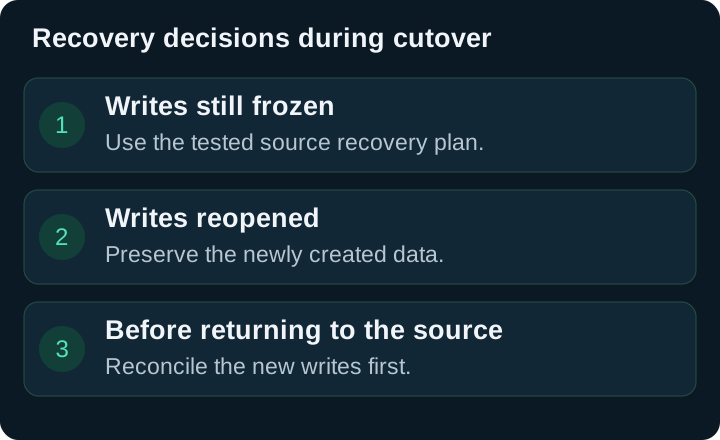
Read the diagram as text
With writes frozen, recover on the preserved source according to the tested procedure. After reopening writes, preserve new data. Before returning to the source, reconcile those new writes. A directory or transactional database needs its own recovery procedure.
After reopening, the old VM does not contain the new writes. Define who may cancel the cutover and how to recover those writes. A directory or transactional database needs an appropriate procedure. Isolate copies to avoid duplicate addresses and repeated processing.
Prepare a pilot VM: a worked example
Goal: decide whether a cutover is ready, using evidence. This fictional case concerns a quotation application on a single VM. It is not a procedure for a domain controller or distributed database. The application owner must adapt the checks to the service.
| What to document | Teaching example | Why it changes the decision |
|---|---|---|
| Service and approver | Quotation application; sales manager | Windows booting does not validate quotation creation |
| Source and target | Record exact ESXi, Proxmox and OS versions | Compatibility must be checked against those versions |
| Configuration | 4 vCPUs, 8 GB RAM, UEFI; 80 GB and 200 GB disks | Identify the system disk and retain the data disk |
| Dependencies | DNS, directory, SMTP, document share | Login may work while export fails |
| Test network | Isolated VLAN, outgoing mail and automatic jobs disabled | Prevent IP conflicts or customer messages from the copy |
| Business tolerance | Maximum downtime of 120 minutes; no accepted writes lost | The window must cover validation and a possible abort |
| Restore | Backup restored on an isolated network; report retained | A successful backup job is not a recovery test |
| Decision | Operator prepares; business owner authorises reopening | Someone must be able to postpone |
RTO is the recovery time objective; RPO is the maximum tolerable data loss expressed as time. For a planned migration, also describe the transactions that must be preserved. Zero RPO requires an effective write freeze and a consistent final transfer, not merely a recent copy.
Calculate a realistic window
In this scenario, 240 GB remains to transfer, at 80 MB/s of measured effective throughput during the pilot. In decimal units: 240 × 1,000 ÷ 80 = 3,000 seconds, or 50 minutes. Effective throughput here includes storage and network limitations; it is not the network adapter's advertised speed.
Add 10 minutes to freeze the service, 15 to start the target and 20 for business acceptance: 95 minutes. The 120-minute window leaves 25 minutes. If aborting and recovering on the source takes 30 minutes, the window is insufficient. Change the method, reduce the final transfer volume or obtain a longer window, then measure again.
This calculation illustrates a cold transfer. Conversion, OVA extraction or a second transfer adds steps. Do not arbitrarily add durations that overlap: time the workflow you will actually use.
Validate the service before reopening access
Define expected results before the pilot. Adapt this illustrative checklist without using real customer data in the examples:
| Test | Expected result | Evidence to keep |
|---|---|---|
| Boot and disks | OS running; system and data volumes present | Target configuration and boot log |
| Access from a representative workstation | Test account logs in with expected permissions | Dated report without passwords |
| Business workflow | Create a test quotation, save it, reopen it and produce its PDF | Test reference and business approval |
| Dependencies | DNS resolution, share and test SMTP reachable | Each check's result; no customer email |
| Data consistency | Last pre-freeze document found; application consistency check accepted | Document reference and check method |
| Recovery | Target backup restored successfully in an isolated environment | Log, duration, result and test limitations |
| Operations | Monitoring active; scheduled job checked when due | Test alert and processing report |
The rehearsal lets you test restore before cutover. After the real cutover, also check the new production backup and recovery options. Do not retire the source until these checks and deferred jobs have been accepted.
Postpone if restore has not been demonstrated, an essential business workflow fails, versions have not been qualified or there is no longer time for a controlled abort. These are suggested decision criteria; the decision-maker must approve them for the actual context.
Exercise: should you reopen the service?
The VM boots. The user logs in but can no longer generate a quotation PDF. Fifteen minutes remain in the window; the tested return to the source takes 25 minutes. The administrator proposes reopening access and fixing the issue later.
Worked answer. Business acceptance has failed and the abort reserve has already been exceeded. Keep access closed, inform the decision-maker and apply the agreed recovery scenario; no option now fits the original window without a decision on the overrun. The pilot should have revealed the missing dependency and moved the decision point earlier. Successful login is not evidence that the service has been restored.
A worksheet for your first VM
Copy this outline into your change ticket. If a blocking prerequisite is unresolved, clarify it before starting cutover.
Service / business owner / operator:
Source, target, OS and application versions:
Disks, firmware, drivers and networks:
Dependencies and pilot isolation:
Tested method / tool version / log:
Write freeze / final state to transfer:
Volume / measured throughput / duration of each step:
Approved window / recovery reserve / decision deadline:
Business tests / expected result / observed result / evidence:
Backup restored / duration / scope / limitations:
Abort before reopening / handling new writes after reopening:
Decision-maker / outcome / date / source retirement conditions:
The practical workbook: pilot, exercise and blank worksheet provides three printable pages. Use it to prepare the migration; the article's commands still need testing against your versions.
Download the editable text worksheet.
Frequently asked questions
How much does a VMware to Proxmox migration cost?
Add assessment + pilot + transfer + storage + backup + operations + temporary coexistence. Compare over the same period and at the same service level. Check Proxmox subscription terms for your hardware; a free tool does not remove validation work.
Can you retain the hardware and backups?
Check compatibility, capacity and restore against the versions you use. Retain access to old VMware backups throughout their retention period; reading them may require keeping software or a licence.
What should you prepare to choose a method?
An inventory of hosts and VMs, OS versions, disk sizes, networks, backups and acceptable downtime. Add business dependencies. These inputs help define a migration plan with Initial Infra.
For the pilot, see our backup testing method and VLAN segmentation guide.
English edition, 28 September 2026, translated from the expanded French guide reviewed on 27 September. The official Proxmox documentation repository and virt-v2v manual were rechecked for that source edition. Cases, durations and numerical outcomes are fictional. Commands are documented, but were not run on a hypervisor for this article. Check the linked documentation for your versions; the workbook supports preparation of the first pilot.
View sources (12)
- Proxmox VM documentation
- Veeam's migration continuity guide
- Proxmox networking documentation
- NAKIVO tutorial
- virt-v2v manual
- Virtualised domain controller architecture
- Proxmox storage documentation
- Proxmox, plug-in and backup server support matrix
- Native live import
- virt-v2v VMware inputs
- networking guide
- Proxmox subscription terms
Support available on this topic
Initial Infra handles these topics for SMBs and mid-size companies. A short call is enough to identify priorities and the right scope of intervention.